What Is Ask Maps?
Your phone rings. A homeowner found your competitor on Google Maps. Not because that competitor is better than you. Not because they have more experience. They showed up because their Google Business Profile was set up correctly, and yours was not.
That scenario is playing out every day. Ask Maps makes it happen faster.
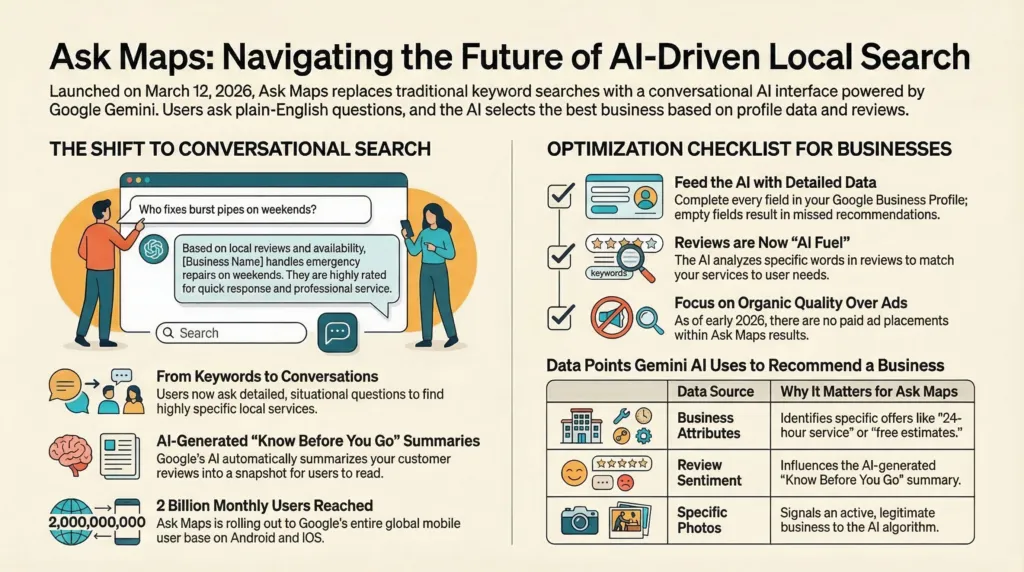
Ask Maps is a feature inside Google Maps powered by Google’s Gemini AI. It launched on March 12, 2026, and it changes how people find local businesses. Instead of typing “plumber near me” and scrolling through a list, a homeowner now opens Google Maps and asks a question in plain English: “Who fixes burst pipes on weekends in my area?” Google’s AI reads that question, searches through business profiles, reviews, photos, and attributes, and returns a direct, conversational answer with a map.
No list of blue links. No scrolling. A direct answer, with your competitor’s name on it, if your profile is not ready.
Google has reported Google Maps has surpassed 2 billion monthly users. Source: Alphabet earnings update reported by 9to5Google. Ask Maps is rolling out to all of them.
Key Takeaways
- Ask Maps launched March 12, 2026 in the U.S. and India on Android and iOS. Desktop is coming soon.
- Customers now ask situation-based questions like “Who does same-day AC repair with good reviews?” instead of typing generic keywords.
- Google’s AI pulls directly from your Google Business Profile, reviews, attributes, and photos to decide if your business shows up.
- An incomplete Google Business Profile will not appear in Ask Maps results, even if you have been in business for 30 years.
- Your customer reviews are now data for AI. Detailed reviews mentioning specific services give the AI more to work with.
- Ask Maps personalizes results based on each user’s past searches and saved places in Google Maps.
- No dedicated ad placements exist in Ask Maps right now. Visibility is based entirely on your listing quality.
- Ask Maps works hands-free with voice commands while driving, which matters most for emergency and urgent home service calls.
- A “Know Before You Go” AI summary now appears inside your business listing, built from your reviews. What it says about your business is out of your control, unless you manage your reviews.
Why Ask Maps Matters for Your Business
Here is the part most business owners miss.
You have spent years building a reputation. You answer your phone. You show up on time. Your customers trust you. But none of that matters to Google’s AI if your listing does not say so.
Ask Maps does not know you personally. It reads your data. Your categories, your services, your attributes, your photos, and most importantly, your reviews. If your listing is thin, the AI skips you. If a competitor down the street has a complete profile and 40 detailed reviews, the AI recommends them. Not because they are better. Because their data is better.
Here is what makes Ask Maps different from the traditional Google Maps search your customers used before:
- Customers describe what they need in plain language. They search by situation, urgency, and preference, not by business category.
- Google’s AI reads your entire profile to decide if you match the question. One incomplete field is one missed opportunity.
- The AI explains why it recommends each business. It pulls language directly from your reviews and attributes to make its case.
For home service businesses, this is the most important shift in local search in years. The homeowner who used to type “HVAC repair” and call the first number in the list now asks, “Who fixes furnaces same-day near me with good reviews?” The AI answers that question with or without you.
How Ask Maps Works
A user opens Google Maps on their phone and taps the Ask Maps button below the main search bar. A conversational interface opens. They type or speak a question in plain language. Google’s Gemini AI processes the question and returns a response that includes a customized map, business listings, review snippets, photos, and direct links to take action.
The AI pulls information from these sources:
- Your Google Business Profile, including business name, categories, hours, services, and attributes
- Customer reviews and review sentiment
- Photos uploaded to your listing
- Business attributes, such as “veteran-owned,” “24-hour service,” or “free estimates”
- Your website, if linked to your profile
- Other online sources including websites, social media, and third-party mentions
Google builds Ask Maps from a database of over 300 million places, informed by a community of more than 500 million contributors. Source: Google Maps product announcement on The Keyword, March 12, 2026.
Ask Maps also personalizes results for each user. It factors in places they have previously searched for or saved in Google Maps. A customer who has saved a competitor to their list may see that competitor recommended first, regardless of your profile quality. This is one more reason to build strong visibility now, before habits form.
Ask Maps also works hands-free while driving. Users speak questions through Google Maps navigation, and Gemini responds with voice answers and recommendations. A homeowner on the way home who realizes their heat stopped working will ask Google Maps out loud. Your business needs to be in the answer.
Know Before You Go: The AI Summary Inside Your Listing
When a customer taps on your business inside Ask Maps, they see a “Know Before You Go” section. Google’s AI reads your reviews and generates a summary of what customers say about your business before the person even calls you.
Think about what that means. Before your phone rings, Google has already told that customer what to expect. If your reviews say you show up on time, communicate well, and do clean work, the AI says that. If your reviews mention problems, the AI surfaces those too.
You do not write this summary. Google writes it from your reviews. The only way to influence what it says is to actively manage your reviews and respond to every one of them.
What Your Business Needs to Do Right Now
Your Google Business Profile is your foundation. If you have not touched it in six months, you are already behind. Here are the six things to fix first:
- Complete every section. Fill in services, hours, service area, business description, and attributes. Leave nothing blank. Every empty field is a missed match.
- Add specific attributes. If you offer 24-hour service, free estimates, military discounts, or emergency calls, those attributes need to be in your profile. The AI uses them to match your business to specific questions.
- Collect and respond to reviews. Ask Maps pulls review content and sentiment into its AI answers. Ask every customer for a review. Respond to every review, including negative ones. The AI reads your responses too.
- Upload photos regularly. Add photos of your work, your team, your vehicles, and completed projects. Recent photos signal an active, legitimate business.
- Keep your information current. Wrong hours, outdated phone numbers, and missing service descriptions cost you customers every day.
- Link your website and keep it consistent. If your profile says you offer drain cleaning, your website needs a page about drain cleaning. Inconsistency between your profile and website weakens your visibility.
Ask Maps Tips for Service-Area Businesses
Most home service businesses do not have a storefront. Customers do not come to you. You go to them. Google has a specific set of rules and settings for businesses like yours, and getting them right matters more now than it ever did.
- Set your service areas by city and ZIP code in your Google Business Profile. Be specific. If you serve 12 towns, list all 12.
- Hide your address if customers do not visit your location. Google supports this for service-area businesses.
- Do not use a virtual office or shared address. Google prohibits this for service-area businesses and it puts your listing at risk of suspension.
- Keep your emergency and after-hours availability accurate. If you take calls at 11 p.m. for burst pipes, your profile needs to say so.
- Build service pages on your website for each core service and each city you serve. The AI reads your website too.
Categories Still Matter
Your Google Business Profile category is one of the first signals the AI uses to decide if you are relevant to a query. Most business owners set their category once and never touch it again. That is a mistake.
- Choose a primary category matching your highest-revenue service. If you are primarily an HVAC company, do not list yourself as a general contractor.
- Add relevant secondary categories for every major service you offer.
- Avoid irrelevant categories. Adding categories you do not serve dilutes your relevance signals and confuses the AI.
- Review your categories every six months. Google adds new category options regularly.
How This Changes the Game for Home Service Businesses
Picture your ideal customer. They own a home. Something broke. They need someone today. They are not sitting at a desktop computer running a careful Google search. They are standing in their kitchen with water on the floor, or they are driving home to a house with no heat, and they are asking their phone a question.
Here is how those questions actually sound now:
- “Who fixes garage doors on Saturdays near me?”
- “Find a licensed electrician with five-star reviews in my zip code.”
- “I need a plumber who does free estimates and shows up the same day.”
- “What HVAC company near me has the best reviews for furnace installation?”
Every one of those questions has a specific answer. Google’s AI picks that answer from the data available. If your data answers the question, you get the call. If it does not, your competitor does.
Google research reported that 50% of smartphone users who conduct a local search visit a store or contact a business within a day. Source: Think with Google, How Mobile Search Connects Consumers to Stores. The customers using Ask Maps are not browsing. They are ready to hire someone.
Your Reviews Are Now AI Fuel
This is the section most business owners underestimate.
Google’s AI does not just count your reviews. It reads them. It analyzes the language, identifies the services mentioned, measures the sentiment, and uses all of it to answer customer questions.
A review that says “Great service, highly recommend” gives the AI almost nothing to work with. A review that says “They replaced our water heater the same day we called, showed up on time, explained everything, and the price matched the estimate” gives the AI specific, usable data about your speed, reliability, communication, and pricing.
The difference between those two reviews is the difference between showing up in Ask Maps and not showing up.
Here is what to ask your customers to include when they leave a review:
- The specific service you performed
- The city or neighborhood where you did the work
- One specific detail about their experience, such as speed, cleanliness, communication, or pricing
Respond to every review. A professional response to a negative review tells the AI, and every future customer reading it, that you take accountability seriously. Ignoring a complaint leaves a gap in your data and a bad impression for every person who reads it.
Voice Search and Ask Maps: The Urgency Factor
Google described Ask Maps as “the first hands-free, conversational driving experience in Google Maps.” Source: Google Maps product announcement on The Keyword.
For most industries, voice search is a nice-to-have. For home service businesses, it is where your most urgent customers come from.
The homeowner driving home to a house with no power. The property manager who just got a call about a burst pipe. The person who locked themselves out at 9 p.m. These people are not typing. They are talking to their phone while they drive.
If your profile includes attributes for emergency service, same-day availability, and after-hours calls, the AI has the data to recommend you for those searches. If it does not, you are invisible to the customers who need you most.
What Is Coming Next: Google Lens in Maps
Google also introduced Lens integration in Maps. Users point their phone camera at a business and ask Gemini questions about it. For home service companies without a customer-facing storefront, this feature has limited immediate impact. What it tells you is where Google is heading.
Every interaction with Google Maps is becoming a conversation. Every piece of data you have published about your business is becoming a source for AI answers. The businesses that build complete, accurate, and detailed profiles now will have a compounding advantage as these features expand.
Tracking Your Visibility in Ask Maps
Here is the honest answer: you cannot track Ask Maps separately yet.
As of March 2026, Google groups Ask Maps impressions with standard Google Maps impressions in your Google Business Profile dashboard. There is no dedicated Ask Maps reporting surface. Google has not announced a timeline for changing this.
What you should monitor right now:
- Total Maps impressions month over month
- Direction requests
- Phone calls from your listing
- Website clicks from your listing
If you improve your profile, add attributes, and start collecting better reviews, watch those numbers over the next 60 to 90 days. An increase in calls and direction requests is a strong signal Ask Maps is working in your favor.
Ads in Ask Maps
Ask Maps launched without dedicated ad placements. Google’s Gemini team confirmed ads are not currently part of Ask Maps but did not rule out future inclusion. Source: GSQI, direct reporting from Google’s Gemini team.
Right now, the playing field is flat. A small, well-run home service company with a complete profile and strong reviews competes on equal footing with a larger competitor. That window will not stay open forever. The businesses that build strong organic visibility now will hold an advantage when ads eventually arrive.
Frequently Asked Questions About Ask Maps
What is Ask Maps on Google Maps and how does it work?
Ask Maps is a conversational AI feature inside Google Maps, powered by Google’s Gemini AI, launched March 12, 2026 in the U.S. and India on Android and iOS, with desktop coming soon.
Instead of typing keywords, users ask full questions in plain language. The AI returns a personalized response with a map, business listings, review snippets, and direct links to call, get directions, or book. Google Maps draws from a database of over 300 million places and a community of more than 500 million contributors to build these answers. Source: Google Maps product announcement on The Keyword, March 12, 2026. Google has also reported Google Maps surpassed 2 billion monthly users. Source: Alphabet earnings update reported by 9to5Google.
How does Ask Maps affect my local business visibility on Google?
Ask Maps determines whether your business appears when a customer asks a conversational question in Google Maps. The AI reads your Google Business Profile, reviews, photos, and attributes to decide if your business matches the question being asked.
An incomplete profile means no match. Strong reviews with specific service mentions improve your chances significantly. Businesses that rank well in traditional search do not automatically appear in Ask Maps. The AI uses different signals, and profile completeness and review quality carry the most weight.
Do I need to pay for ads to show up in Ask Maps results?
No. As of March 2026, Ask Maps does not include paid advertising. All results are organic, based on your Google Business Profile data, reviews, and attributes. Google could add ads in the future, but right now visibility is earned, not bought.
Focus on profile completeness, review volume, review detail, and accurate attributes. These are the factors the AI uses today.
What should I do to optimize my Google Business Profile for Ask Maps?
Complete every section of your Google Business Profile. Add all services, set accurate hours, write a detailed business description, and select every relevant attribute, such as free estimates, 24-hour service, or veteran-owned.
Upload recent photos of your work and completed projects. Collect detailed reviews and ask customers to mention the specific service performed and their city or neighborhood. Respond to every review. Treat your profile as a document you update monthly, not something you set up once and forget.
Does Ask Maps work with voice search while driving?
Yes. Ask Maps integrates with Google’s hands-free driving experience. Users speak questions through Google Maps navigation, and Gemini responds with voice answers and business recommendations. Google described this as the first hands-free, conversational driving experience in Google Maps. Source: Google Maps product announcement on The Keyword.
For emergency home service businesses, this is where your most urgent customers come from. Add attributes for emergency service, same-day availability, and after-hours calls if you offer them.
How are Ask Maps results different from regular Google Maps search results?
Traditional Google Maps search returns a ranked list of businesses based on keywords, proximity, and standard ranking signals. Ask Maps returns a conversational response that explains why each business was recommended, with review snippets, photos, and reasoning pulled directly from listing data.
This is a shift from keyword matching to intent matching. If a customer asks for weekend availability, free estimates, or a specific service, your listing data must state those details clearly or you will not appear.
Is it possible to track how many customers find my business through Ask Maps?
Not separately, as of March 2026. Google groups Ask Maps impressions with standard Google Maps impressions in your Google Business Profile insights. There is no dedicated Ask Maps reporting surface yet.
Track total Maps impressions, calls, direction requests, and website clicks in your Google Business Profile dashboard. Compare month over month after you improve your profile. An increase across those metrics is a reliable indicator Ask Maps is contributing.
What is the “Know Before You Go” feature in Google Maps and how does it affect my business?
Know Before You Go is an AI-generated summary that appears inside your business listing when a customer taps on it in Google Maps. Google’s AI reads your customer reviews and generates a summary of what people say about your business before the customer decides to call.
You do not write this summary. Google writes it from your reviews. If your reviews are detailed and positive, the summary reflects that. If your reviews mention problems or your listing has thin review data, the summary will reflect that too. The only way to influence what it says is to actively collect detailed reviews and respond to every one of them.