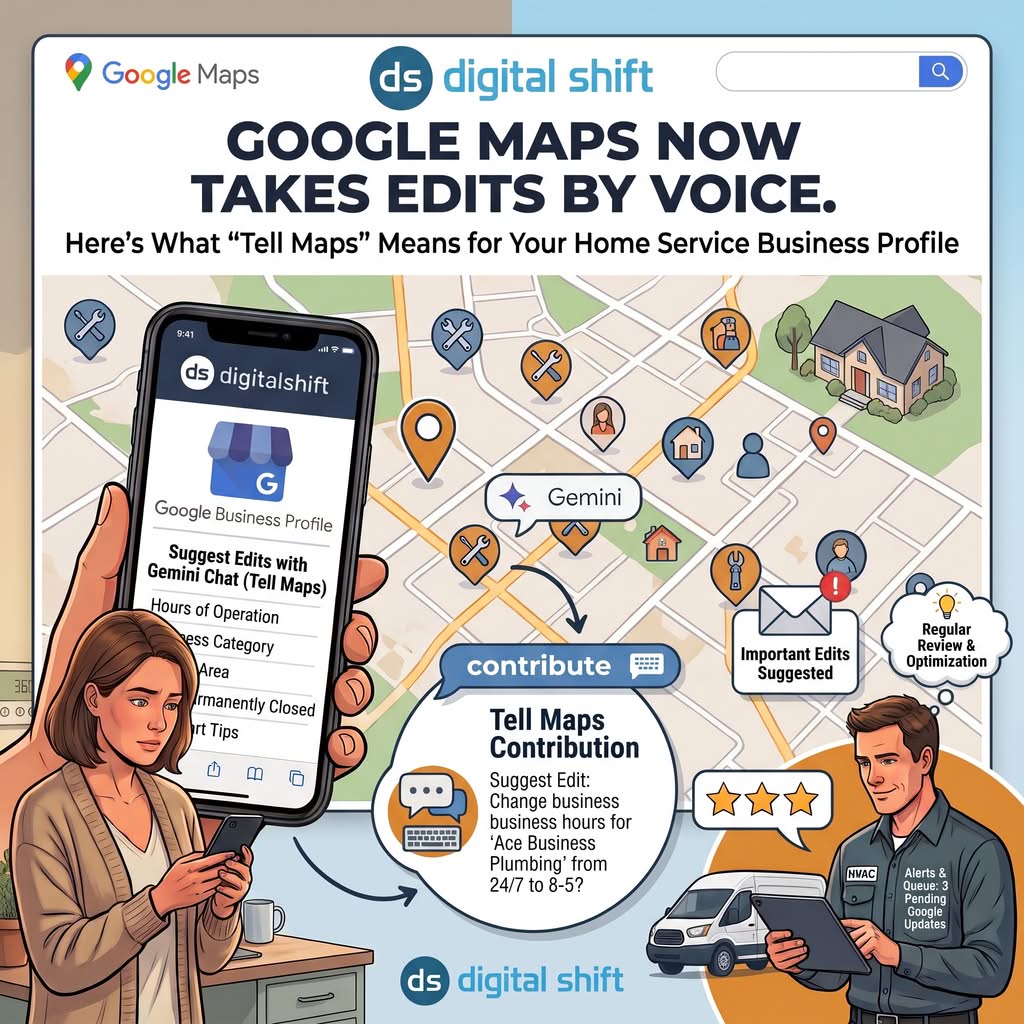
Google spent the spring teaching Maps to answer questions. In August it taught Maps to take dictation. Tell Maps lets any signed-in user change a listing’s hours, mark it closed, or post a tip about it by typing one sentence into a Gemini chat. If you run a plumbing, HVAC, roofing, or electrical company, that’s your Business Profile they’re editing.
For years, suggesting an edit to someone else’s Google Maps listing meant knowing where to look. Open the place. Scroll past the reviews. Find the link buried under the About section, pick the right field, submit, and wait. Most homeowners never did it. Most competitors didn’t bother either.
That friction is gone.
Tell Maps is a conversational contribution tool inside Google Maps, powered by Gemini, that lets users suggest edits to business hours, mark places closed, edit attributes, upload photos, and post short tips through a chat interface. Google announced it on August 6, 2026 and said the U.S. rollout was underway. Early testers reported it showing up in their apps by the first days of September. It lives inside Ask Maps and the Contribute tab. Google says its protection systems review every suggestion before publishing, and verified, active profile owners now receive email alerts about important edits before those edits go live. For a home service business, that cuts two ways: your listing data is easier for strangers to change, and your customers’ words are more likely to appear in the AI answers homeowners read before they call anyone.
What Tell Maps is, and where it lives
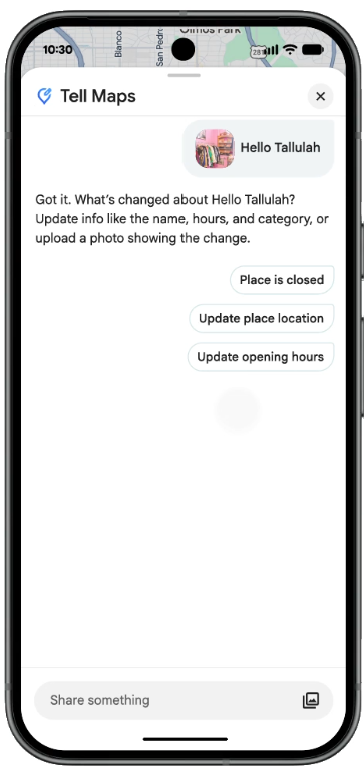
Google’s help documentation lists five things Tell Maps can do: report business hours, mark places closed, edit place attributes, share local tips, and upload photos. The launch post added a detail worth sitting with. A user can photograph a storefront sign, and Maps will read the hours off the image, then ask them to confirm before it submits the edit on their behalf.
You reach Tell Maps three ways:
- Open the Contribute tab, tap the Tell Maps card, then type or speak what changed
- Inside an Ask Maps conversation, tap the plus button and choose Update a place, or Post a tip or photo
- Under any business that shows up in an Ask Maps answer, tap the three-dot menu and pick Update the map (or Post a tip or photo)
That third path is the one that should get your attention.
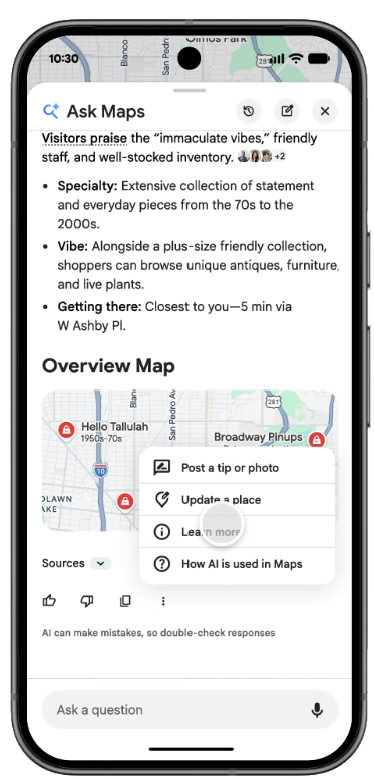
A homeowner asks Maps who does same-day water heater replacement. Gemini answers with three to five companies, a summary of what reviewers say about each, and an overview map. Right there, under your name, sits a menu that lets them post a tip about you or update your listing. No hunting. No separate form. The edit button now lives inside the answer.
Two limits as of this writing. First, Google’s help page states the feature is U.S. only. Ask Maps expanded to Canada, Australia, Brazil, Japan, Mexico, and Indonesia in August, but the conversational editing piece hasn’t followed yet. Canadian owners get the read side of this loop before the write side. Second, it isn’t fully agentic. Claudia Tomina, who tested the rollout, reported through Search Engine Roundtable that when she asked Tell Maps to leave a review, it handed her a link to do it herself instead of posting one. Hours, closures, tips, and photos it will file for you. Reviews it won’t.
Ask Maps and Tell Maps are one loop, and your profile sits in the middle
Ask Maps launched on March 12, 2026 as Google’s Gemini-powered conversational layer over Maps. It draws on more than 300 million places and reviews from over 500 million contributors, and it personalizes answers based on what the user has searched and saved. Our Ask Maps glossary entry covers the basics. Short version: a homeowner describes a problem, Gemini picks a handful of businesses, and it explains why each one fits.
Search Engine Land published hands-on testing in April that ran plumber, electrician, and HVAC prompts through Ask Maps at five levels of complexity. Three findings matter here:
- Answers typically included between three and eight businesses, not a scrollable list
- Review language did most of the framing. Companies got described as responsive, honest, good with older homes, or repair-first based on what customers had written
- There was no clickable call button in the answer itself. The homeowner still had to tap into the Google Business Profile to call
Read that last point twice. Ask Maps decides who gets mentioned, but your profile still closes the deal. Whatever’s on it when the homeowner taps through is what they act on.
Tell Maps completes the circuit. The same homeowner who read Gemini’s summary of your company can now write back into the data that produced it. Google frames tips as short, bite-sized insights that may appear in the “Know before you go” panel across Google. Its own example is a note that more parking sits behind a building. For a trade, the equivalent is a customer typing “showed up on a Sunday when nobody else would” or “ask about the furnace tune-up bundle.” Small notes. Read by the next person asking the same question.
One structural detail we noticed in the help documentation: Google files a contributor’s tips under the Q&A section of their public profile. That suggests tips ride on the Q&A infrastructure rather than reviews. Treat that as our read, not Google’s statement, but it changes how you’d monitor them.
The upside is real, and it’s the part our co-founder Matt Miciula keeps coming back to. Listing data has always lagged reality. Hours change, phone numbers change, a company stops offering duct cleaning. Lowering the cost of a correction should mean fresher data on every listing, yours and your competitors’. And a homeowner describing how a service call went gives the next homeowner something a star rating can’t.
Why a plumber should care more than a coffee shop
A coffee shop has a storefront, a sign, staff behind the counter, and regulars walking past all day. If someone changes its hours wrong, a customer notices by lunch and the owner hears about it by two.
A service area business has none of that. No storefront. No sign for someone to photograph. Address hidden by design. For most plumbers, HVAC companies, roofers, and electricians, the Google Business Profile is the storefront, and now it’s the only thing in this workflow a stranger can photograph, describe, and edit.
The fields most exposed to a bad edit are the ones that drive calls:
- Hours. A 24/7 emergency line that gets edited to 8 to 5 stops showing as open at 9 p.m. in January.
- Permanently closed. One accepted suggestion and your listing greys out.
- Primary category. Plumber becomes Plumbing Supply Store and you quietly drop out of service queries.
- Location pin and service area. Wrong pin, wrong distance signal, wrong Local Pack.
Consider the scale before anyone could do this by talking. Google reported that its community suggested 80 million updates to business hours, contact information, and similar fields in 2025. Separately, Google said it blocked 79 million inaccurate or unverified edits that same year. Google didn’t say whether those two figures overlap, but the takeaway holds either way. Edit traffic on Maps was already in the tens of millions with the old, hard-to-find form. Tell Maps removes the form.
Put a number on the downside for your own shop. Say you run a heating company in a cold market and January Sundays bring you six emergency calls at $450 a ticket. If a bad hours edit slips through on a Friday and sits until Monday, that’s roughly $2,700 in booked work that went to whoever Maps showed as open. Not a catastrophe. But it’s one edit, one weekend, and you’d have never known why the phone went quiet.
The competitor question, and what Google says about moderation
Here’s Matt’s caution, plainly: if your Google updates queue gets busier this fall, don’t assume Google’s algorithm is behind it. Assume people. More homeowners now have a frictionless way to suggest changes, and so does anyone else with a Google account, including the shop across town.
We’re not the only ones raising it. Whitespark founder Darren Shaw wrote on LinkedIn (via Search Engine Roundtable) that if enough people tell Google something about a business, Google may treat it as a relevance signal, and that the same tool can be pointed at a competitor. His line: “we’ll have to see how Google handles sabotage.”
To Google’s credit, the moderation stack isn’t nothing. The launch post says Maps’ “built-in protection systems” review suggested edits for accuracy and won’t publish policy violations. In April, Google announced three protections that now matter more than they did in April:
- Gemini models screen suggested edits, starting with place names, and block policy violations before they go live, including social or political commentary slipped into a listing
- Verified and active owners get proactive email alerts so they can review important edits before publication
- Sudden spikes of spam reviews trigger removal, a pause on new reviews, an owner alert, and a public banner explaining the pause
Google’s 2025 numbers back the claim that the systems run at scale: 292 million policy-violating reviews blocked or removed, 79 million bad edits blocked, 782,000 accounts restricted, and 13 million fake Business Profiles taken down.
Now the open questions, because there are several.
Google hasn’t published how tips get moderated beyond saying they must comply with Maps content policies. It hasn’t said whether tips or edit volume feed ranking. Darren Shaw’s relevance-signal point is a reasonable hypothesis, not a confirmed mechanism. Google also hasn’t defined “active” in “verified and active owners,” which means an owner who set up a profile in 2022 and never logged back in may not be on the alert list. And we haven’t seen a dedicated owner path for disputing a published tip the way you can flag a review. Until we do, treat tips like Q&A: watch them, and report policy violations through the standard content tools.
One early data point cuts in your favor. In her testing, Claudia Tomina couldn’t get Tell Maps to locate a service area business she tried to mark as nonexistent. That’s one test by one person, not a rule. But it hints that hidden-address listings may be harder for the tool to target, at least for now.
What to check this month
1. Confirm the alerts can reach you. The email attached to your profile’s primary owner is where Google’s edit alerts land. If that inbox belongs to a former office manager or a marketing vendor you fired in 2024, fix it this week. Then whitelist the sender. Since Google hasn’t defined “active,” log in to the profile regularly so you don’t fall off the list by default.
2. Clear the Google updates queue weekly. Pending edits don’t wait forever. Log in, review anything marked as a Google update, accept the correct ones, reject the rest. If you’re not sure how a field got changed, our post on what to do when Google Business Profile rankings drop walks through the diagnostic order.
3. Lock down the four fields that hurt most. Set special hours for every holiday through February now, before someone else does. Confirm your primary category matches what you actually get paid for. Recheck your pin and service area, especially if you’ve read our breakdown of service area versus physical address versus hybrid profiles and made changes since.
4. Run a monthly Ask Maps audit. Type five homeowner-style prompts into Ask Maps, from “HVAC company near me” up to “not sure I trust this furnace quote, who gives second opinions near me?” Note whether you appear, how Gemini describes you, and what it lists under Sources. That description is built from your reviews and profile. If it’s wrong, you now know what to fix.
5. Feed the loop with real review language. Since review wording shapes how Ask Maps frames you, ask happy customers to mention the job and the outcome, not just the stars. Our Google review policy changes post covers what’s still allowed when you ask. What isn’t allowed: posting tips or edits about your own business, or a competitor’s, to tilt the data. Google’s contribution policies bar conflict-of-interest content, and the Tell Maps help page says every tip must comply with them.
6. Multi-location operators, use the API. Google’s Business Information API exposes pending edits as Google Updates. The locations.getGoogleUpdated call returns the suggested values, the hasGoogleUpdated flag in location metadata tells you which locations have something waiting, and Cloud Pub/Sub can push notifications in real time. If you manage 15 branches, weekly manual logins won’t scale. A Pub/Sub subscription will.
7. Add edit volume to your monthly report. Count suggested edits received, accepted, and rejected. A jump in September and October is the Tell Maps rollout showing up in your data. A jump on one profile and not the others is something else.
Our take
Tell Maps is a good feature that shifts a chore onto you.
Good, because the old suggest-an-edit path was so buried that bad data sat for months. Lower friction means fresher listings, and fresher listings mean fewer homeowners driving to a closed showroom or calling a disconnected number. When the added content is a real customer describing how a service call went, the next homeowner gets a better signal than a rating alone provides.
A chore, because Google gets millions of free data corrections and you get an email. The alerts beat a dashboard nobody checked. But catching a wrong edit, a malicious one, or a tip that misrepresents you now sits with the owner and whoever manages the profile. Google’s own numbers say Gemini screening blocks tens of millions of bad edits a year. Nobody outside Google knows the miss rate.
We’ll be watching two things through the end of the year: whether suggested-edit volume climbs on client profiles, and whether Google publishes anything on how tips are weighted. If either moves, we’ll update this post.
FAQ
What is Tell Maps in Google Maps?
Tell Maps is Google’s Gemini-powered chat tool for contributing to Maps. Users type or speak what changed about a place, and Maps drafts and submits the suggestion: new hours, a closure, an attribute edit, a photo, or a short tip. Google announced it on August 6, 2026, and U.S. users began seeing it in early September. It lives inside Ask Maps and the Contribute tab.
Can a competitor use Tell Maps to change my Google Business Profile?
Anyone with a Google account can suggest an edit to any listing, and Tell Maps makes that easier. Whether it publishes is up to Google’s review systems, which the company says now include Gemini screening and blocked 79 million bad edits in 2025. Verified, active owners also get email alerts about important edits before they go live. Monitor the queue anyway.
Is Tell Maps available in Canada?
Not yet. Google’s help page lists the feature as U.S. only. Ask Maps, the question-answering side, rolled out to Canada in August 2026. Google has said conversational contributions will reach more countries over time without giving dates.
Do Tell Maps tips affect local rankings?
Google hasn’t said. Tips are user content that may appear in the “Know before you go” panel and in Ask Maps answers. Digital Shift expects Google to treat them as a relevance signal, but that’s speculation until Google documents it.
How do I know if someone suggested an edit to my profile?
Log in to your Business Profile and look for pending Google updates, which show the suggested value next to your current one. Google also started sending proactive email alerts to verified, active owners in April 2026. Multi-location businesses can pull the same data through the Business Information API and subscribe to Cloud Pub/Sub notifications.
What’s the difference between a tip and a review?
A review is a full write-up with a star rating that affects your average. A tip is a one-line note without a rating, meant for quick, useful facts like payment methods or where to park. Google stores a contributor’s tips under the Q&A section of their public profile, not alongside their reviews.
Get ahead of the edits
Digital Shift manages Google Business Profiles for home service companies across the U.S. and Canada. That work now includes watching the edit queue, keeping hours and categories locked down, and checking how Ask Maps describes each client to the homeowners asking about them.
If you’d rather find out about a bad edit from us than from a quiet phone, book a strategy call. We’ll pull your profile’s edit history, run it through Ask Maps, and tell you what we see.
Sources
- Google, “Ask Maps gets more helpful with food ordering and more,” Miriam Daniel, August 6, 2026: https://blog.google/products-and-platforms/products/maps/order-food-in-ask-maps/
- Google Maps Help, “Contribute to Google Maps with Tell Maps”: https://support.google.com/maps/answer/17515915
- Google, “New ways we’re protecting businesses on Maps,” Bibek Samantaray, April 16, 2026: https://blog.google/products-and-platforms/products/maps/new-ways-were-protecting-businesses-on-maps/
- Google, “How we’re reimagining Maps with Gemini,” March 12, 2026: https://blog.google/products-and-platforms/products/maps/ask-maps-immersive-navigation/
- Google, “3 updates that make contributing to Maps easier,” April 7, 2026: https://blog.google/products-and-platforms/products/maps/contributor-updates/
- Google Business Profile Help, “Understand how Google sources & uses info in Business Profiles”: https://support.google.com/business/answer/2721884
- Google Developers, Business Information API, “Manage Google Updates”: https://developers.google.com/my-business/content/accept-or-reject-updates
- Search Engine Roundtable, “Google Tell Maps Starts To Roll Out,” September 2, 2026: https://www.seroundtable.com/google-tell-maps-42001.html
- Search Engine Land, “Google Ask Maps is moving from listings to recommendations,” April 14, 2026: https://searchengineland.com/google-ask-maps-recommendations-474192
- Search Engine Land, “Google Maps turns exploration into a conversation with Ask Maps,” March 12, 2026: https://searchengineland.com/google-maps-turns-exploration-into-a-conversation-with-ask-maps-471491
- Android Authority, “Google preps new Tell Maps tool,” April 8, 2026: https://www.androidauthority.com/tell-maps-gemini-3655906/